Turn text into visiuals
Say goodbye to late-night lesson planning! No more manually organizing scattered knowledge points or spending hours designing PPT slides—PicDoc does it all in one go! New users get free credits to boost your teaching efficiency right away.
Simply input the text of your subject or grade-level knowledge points, or upload documents, and in just 10 seconds, PicDoc will generate clear, visual logic maps. It also creates uniform, teaching-friendly PPT slides that save you 80% of lesson prep time. No need for professional design skills, no repeated adjustments. With PicDoc, you can focus more on teaching design and help students grasp and retain knowledge faster.
Here are three real teacher use cases that show you how PicDoc simplifies lesson planning in various teaching scenarios, and unlocks credit benefits along the way!
Elementary School English Teacher: Fun Visuals Make Vocabulary Learning Less Boring
For lower-grade English teaching, the key is to spark interest. Vocabulary like animals and colors are scattered and disorganized. Manually organizing them into tables is not only dull, but it also fails to capture children's attention. Designing matching PPTs requires searching for cartoon images and adjusting layouts, taking at least an hour for one lesson. Especially for younger students, who have short attention spans, simple written notes will only disengage them.
With PicDoc, just input core requirements like “Grade 2 English animal vocabulary,” and it will generate a visual logic map with modules for “word - part of speech - example sentence.” The colors are cute, and the fonts are round (perfect for younger students). It will also generate a matching PPT with a consistent style.

In just 10 seconds, you'll get a delightful result: the visual logic map will automatically categorize the knowledge points, using simple animal icons, soft pastel colors, and gentle tones to suit the aesthetics of younger students. You can also generate a PPT with multiple style options, ensuring consistency in icons, fonts, and colors across all slides—no more manually inserting images or adjusting formatting.

The one-hour lesson planning task is compressed to just 10 minutes. In class, you can guide students to categorize the vocabulary using the logic map and present example sentences and images through the PPT. Students will follow along with the visual content, making it easier for them to take clear, organized notes. This fun, visual way of presenting knowledge not only reduces the teacher's workload but also makes the English class for younger students engaging and efficient.
High School History Teacher: Systematically Organizing Complex Topics for Easy Understanding
High school history involves complex and interconnected topics. For example, the “Ancient Chinese Imperial Examination System” covers its establishment in the Sui Dynasty, its improvement in the Tang Dynasty, its peak in the Ming and Qing Dynasties, the exam process, and its historical impact. Drawing a framework by hand is not only time-consuming but also prone to missing key historical moments. When creating review materials, teachers often need to repeatedly adjust the hierarchy of knowledge points to ensure logical coherence, often spending half a day without a satisfactory result. Meanwhile, students find it difficult to follow the scattered board notes and written material, which reduces their efficiency in review.
With PicDoc, simply input the core prompt like “High School History Ancient Chinese Imperial Examination System,” and it will generate a visual logic map divided into modules such as “origin and development - exam process - historical impact,” highlighting key dates, with a simple, academic color scheme (suitable for history subjects). It will also generate a corresponding PPT, with each slide reflecting one module from the logic map, and key points automatically bolded.

The generated visual logic map has clear levels, using a timeline to connect the key changes in the imperial examination system. The content within each module is clearly presented, and key dates are highlighted for easy reference. The map can be directly used as classroom notes or printed as a review guide for students. If needed, you can also prompt AI to quickly generate background analysis, focus points, or thought-provoking questions to enhance the teaching value of the material.
University Lecturer: Breaking Down Abstract Principles to Make Complex Concepts Easier to Understand
University subjects often involve specialized and abstract concepts. For example, in economics, “Market Adjustment Mechanisms” cover core principles like supply and demand, price fluctuations, and resource allocation. Manually organizing such concepts is time-consuming and difficult to present in an intuitive way. When creating course materials, teachers need to balance professionalism and clarity, while also managing the proportion of text and diagrams, which can be a challenge for non-design faculty. Students often struggle to understand the dry text and complicated theories in textbooks.
PicDoc perfectly solves this problem. Simply input the core prompt like “Microeconomics Supply and Demand,” and PicDoc will generate a visual logic map divided into modules such as “adjustment methods - core principles - real-world applications,” with a rigorous, professional color scheme (suitable for university courses). It will also generate a corresponding PPT, matching the tone of professional course explanations, and you can directly insert classroom examples.
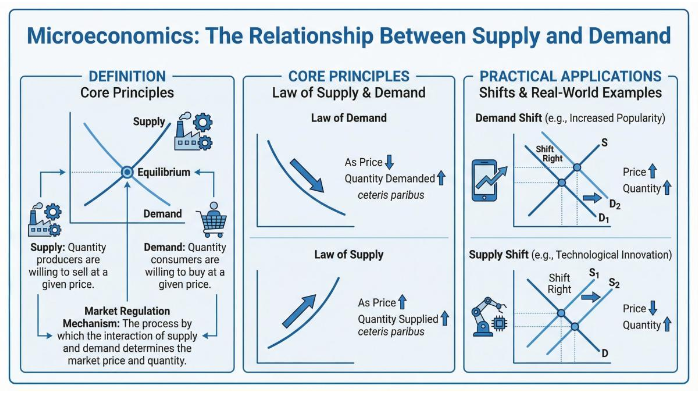

The generated visual logic map breaks down the abstract market adjustment mechanisms into clear modules, using arrows to show the connections between the principles, making complex relationships easy to visualize. The PPT maintains a professional, steady style, with clear modules for each knowledge point and space for real-world case studies. Teachers can directly add actual economic examples without starting from scratch.

Why Are Teachers Using PicDoc?
Whether it's fun teaching for younger students, systematic knowledge organization for high school, or abstract principle breakdowns for university courses, PicDoc accurately matches the needs of teachers. Its core advantages are reflected in three key points:
- Efficient and Convenient Knowledge Visualization
No need to draw by hand. Simply input the text, and PicDoc will generate a visual logic map that fits any grade level and subject, organizing scattered knowledge points so students can easily understand and retain the information. - AI-Generated PPTs Save Time and Effort
Once the logic map is generated, PicDoc will immediately create a uniform PPT. No need for professional design skills—save time on layout and finding images. - Strong Compatibility Across All Scenarios
PicDoc covers all grade levels (from elementary to university) and subjects (such as language arts, English, history, and economics), quickly matching any lesson planning needs.
Moreover, PicDoc supports multiple input methods: online text input, copy-paste, and document upload (PDF or Word) for text extraction. The generated charts and PPTs can be freely exported as PNG, JPG, or PDF, making them easy to insert into any teaching material. Whether for classroom explanations, after-class reviews, or presenting teaching outcomes, PicDoc can easily handle it.
Say goodbye to tedious chart-making and PPT formatting! With PicDoc, you can now prepare lessons quickly and efficiently. Register today to get free credits as a new user, unlock lesson planning features across all grades and subjects, and save 80% of your preparation time, so you can focus on teaching design and student development. Click [Start Now] to experience the new efficient lesson planning mode and make your classroom explanations more effective, and students’ understanding easier!
Read more
How to Create Relationship Charts for Characters in Movies, Books, and Textbooks? A Super Practical and Simple Method
Published at:2026-04-08
AI-powered one-click generation of intangible cultural heritage visualizations? This tool actually does it!
Published at:2026-04-08
PicDoc: One-click experimental flowchart generation—the ultimate tool for preparing lab classes
Published at:2026-04-08
7 Best AI Flowchart Generators in 2026: Turn Ideas into Flowcharts in Minutes
Published at:2026-03-31
5 Best Biomedical Illustration Tools Reviewed in 2026 | Features, Use Cases & How to Choose
Published at:2026-03-30
4 Best AI Knowledge Card Generators Comparison | Flashcards and Study Cards
Published at:2026-03-27
How to Create a Thesis Technology Roadmap | A 3-Step Practical Guide With Free Tools
Published at:2026-03-24
3 Best Medical Illustration Tools for Research Figures and Presentations
Published at:2026-03-23
Latest Release
How to Create Relationship Charts for Characters in Movies, Books, and Textbooks? A Super Practical and Simple Method
Published at:2026-04-08
AI-powered one-click generation of intangible cultural heritage visualizations? This tool actually does it!
Published at:2026-04-08
PicDoc: One-click experimental flowchart generation—the ultimate tool for preparing lab classes
Published at:2026-04-08
7 Best AI Flowchart Generators in 2026: Turn Ideas into Flowcharts in Minutes
Published at:2026-03-31
5 Best Biomedical Illustration Tools Reviewed in 2026 | Features, Use Cases & How to Choose
Published at:2026-03-30
4 Best AI Knowledge Card Generators Comparison | Flashcards and Study Cards
Published at:2026-03-27
How to Create a Thesis Technology Roadmap | A 3-Step Practical Guide With Free Tools
Published at:2026-03-24
3 Best Medical Illustration Tools for Research Figures and Presentations
Published at:2026-03-23
Turn text into visiuals
Turn complex concepts into intuitive visuals